Archive
Dealing with Grief in a Social Setting

We had to put our family dog down.
Princess Buttercup of Petersburg was my daughter’s first real pet and as my daughter grew so did Buttercup. For the past twelve years we celebrated life’s events and Buttercup was right there with us, every step of the way. Birthdays, holidays, even more pets; we could look back through our memories and there was my daughter’s best friend, a part of the family, celebrating right there with us. And now there is a hole in our hearts and lives where Buttercup used to live on a daily basis.
The sorrow that gripped my family was intense and each of us dealt with it in a different way; but it seemed to hit my daughter the hardest. She withdrew from the family and seemed to want to deal with the death of her friend on her own. At least that is what I thought until I saw my daughter’s Facebook status.

I read her words and they literally tore open the wound that I had so carefully closed the previous day. As I fought back the tears I suddenly realized that my daughter had not withdrawn, she had simply found a way to share her pain in a way that I could not and she chose to use her social network to do so.
Don’t get me wrong, I also wanted to say something about Buttercup, but I struggled to find just right words. It seemed that every carefully crafted message that I wrote was quickly dismissed as I considered each one inappropriate for one group of friends or the other. I wanted to confide in my closest friends but not share with a general audience. I wanted to post something that would honor Buttercup’s memory, but I didn’t want to deal with the awkward questions or the “I feel your pain” stories that were sure to follow as people felt obligated to respond to my post. So I simply said nothing wishing that Facebook truly had some way for me to selectively share my feelings with my closest friends. But on Facebook, you are either an open book, or you are forced to take your business elsewhere? But where? They have already cornered the market on all of my friends.
My lack of saying something made me question if I truly shared in my family’s grief. But my wife did not rush out to post either so it made me wonder if this is a generational thing. Are today’s youth able to post about every aspect of their lives while we still like to compartmentalize ours? Are the concepts of context and roles breaking down as everyone has access to the same information about you? Should your clients be privy to the same information as your family members? Does that draw them closer or push them away?
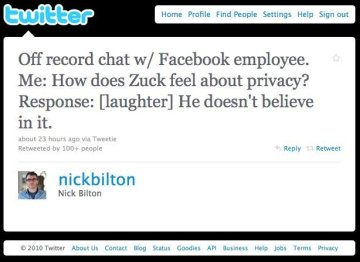 In 2010, Mark Zukerberg declared that privacy was no longer a “social norm” and that user information should be public. This was largely based on Facebook’s observation of the types of information that people were sharing with each other. As such, Facebook modified their privacy policies and subsequently their platform to share more and more information. But there are some things that I simply don’t want to share with the entire world. So my only options are to either adopt Facebook’s open model or suppress my activity on the site. Thus far, I have chosen the later, not because it is what I want to do, it is only because it is the prudent thing to do. Some people are comfortable sharing everything with everyone, some are not. But while I was struggling with the right words to say, my daughter was saying them.
What I find interesting is that there is an entire generation that has essentially become open books with both their feelings and their personal information. While older folks value their privacy, it seems like the younger ones are more open to sharing. Is this because they agree with Zuckerberg’s view on privacy? Or is it that they simply do not have a choice and they must play by someone else’s rules. I contend that it is the later and people are willing to exchange privacy for convenience in a world where they don’t have both. Facebook takes advantage of the fact that humans are social beings and the drive to be social is stronger than the drive to be private or simply careful. Most “Millennials” are OK with this and don’t give it a second thought – that is until their openness is taken advantage of and they are compromised in some way. Then they scream about how this could have happened and why they were not protected.
In the case of Buttercup’s passing, my daughter chose to play by Facebook’s rules and share her feelings with the world. Did she consciously make this choice, or did she simply use the only tool available to her express her feelings? Does she value privacy as much as us “older folks” and would she have chosen to use another conduit to share her grief if it were available? Ah, there’s the real question, but it is one that is impossible to answer until she has real alternatives to choose from. Ultimately Facebook will face more and more competition (think Google+) and some competitors will place a higher value on privacy than Facebook, but they have a lot of catching up to do. As Facebook continues to grow larger each day and as they approach an impending IPO that will put them on par with companies like General Electric, it is going to be more and more difficult for competitors to capture the intellectual capital that so many users have elected to invest in Facebook. Can competitors erode Facebook’s market share? Only time will tell, but in my opinion, it is about time.
The Biggest Expense to Your Company
 While reading the book, I’m Feeling Lucky: The Confessions of Google Employee Number 59, I stumbled on a question that Sergey Brin asked of his marketing folks. It really got me to think about how we look at corporate costs.
Think for a second, what is the biggest expense that a company can incur? Is it facilities cost, equipment leases, or big-ticket purchases? Is it health care, taxes, or employee salaries. It must be salaries and benefits, right? That is what has been preached to me from well-meaning CFOs.
Wrong! The single largest expense a company can incur is “opportunity cost” and it can literally make or break a company.
(Sorry, I set you up.)
Opportunity cost can be defined as the ‘profit foregone by selecting one alternative over another. It is the net return that could be realized if a resource were put to its next best use. It is “what we give up” from “the road not taken.”‘

It is like I try to teach my kids, every day you make decisions to do (or not do) something. When you decide to do one thing, you are consciously (or subconsciously) deciding NOT to do something else. It is the consequences of those decisions that directly impact opportunity cost. In the case of companies, every action taken (or not taken) has an affect on the bottom line.
It is the phone call that is not made.
It is the product that is not shipped.
It is the project that is not completed.
It is the process that is not managed.
It is the follow-up that is not performed.
It is the questions that were not asked.
All of these have a direct impact on business either immediately or down the road – but they definitely have an impact.
Thinking in terms of opportunity costs takes a different mindset; one that is not necessarily natural to most people. But considering it in our daily actions can make all the difference in the success or failure of a company.
OK, so as I wrote this, I was also preaching to myself, but I couldn’t miss the “opportunity” to put it out there.
Trust – The Missing Ingredient
I was having a conversation with friends the other day and while it may sound nerdy as hell, the topic was focused on identity. I swear (trust me) that no drinks were involved but the conversation went pretty deep, nonetheless. What is identity, how is it used, and how can it be protected? Like Aristotle and Plato before us, we modern day philosophers discussed the various aspects that make up our identity, how we can control it, and how we can selectively share it with our intended audiences. In an era when our private information has been unleashed like the proverbial opening of Pandora’s Box, how can we regain control of our identities without impacting our existing relationships or experiences?
But what about identity? What is it really, and why should you care?
When I think about identity, I think in terms of aggregation, management, and sharing. Each of these are key ingredients when it comes to users owning their own identities, but each of these can be further strengthened when we add trust to the mix. So, what is the recipe for success as it pertains to trusting identities in cyberspace? Let’s take a closer look at each of these ingredients to see.
Aggregation
My identity is the aggregation of all the things there is to know about me. One could trivialize this by saying it is simply all the discrete data elements about me (i.e. hair color, height, ssn, etc.) but in essence, it is much more. It consists of my habits, my history, my data, my relationships – basically everything that can be me and everything that can be tracked about me. Identity information is not found in a single location, it is distributed across multiple repositories but this informaiton can be aggregated into a virtual identity – which is essentially, me.
Management
When we allow someone to manage their own identity, we are allowing them to control their discrete data elements, but we are also allowing them to manage every other aspect about themselves as well. You can change your mobile number attribute (data element) when you get a new phone, or you can change your address attribute when you move. But just like you can remove the cache, history, and cookies in your browser, you should be able to maintain your privacy by removing (or hiding) your identity characteristics as well. Identity management simply means that I am able to manage those aspects of my identity that are my own.
Sharing
In real life, I have the ability to select which characteristics and/or information about myself that I want to share with each of my friends, family, co-workers or acquaintances. My work-related benefits stay private between my boss and I in the workplace. Conversely, I don’t share my family conversations within the office. Investment information stays private between my broker and I, yet I Tweet favorite quotes to the world. In essence, I selectively share information with different audiences based on the role I am playing at that time. Online personas facilitate the same selective sharing within the social web similar to our interations in the real world. I may take on a different persona as I interact in the virtual world and elect to share different information with each audience based on where I elect to use that persona. This also means that I can act anonymously if I so choose (which is similar to going ‘incognito’ in your browser).
Trust
Sharing data with others fulfills my desire to communicate information about me to you, but just like in real life it is totally your option to accept the validity of that information or not. To take the sharing to the next level (and address a major need on the Internet today), we need to have some method of trusting the information that we receive. Trust is transient (it changes), contextual (it is based on the situation), and 100% given by the receiving party – essentially they decide to trust you or not. In the real world we use driver’s licenses, passports, or referrals from friends to validate users and establish trust. This is no difference in the social web except for the fact that we are not seeing each other face to face and do not have the ability to provide a driver’s license as proof of identity. Hence the need for another method.
If the ingredients in the identity cake are aggregation, management and sharing, then validation is the icing on the cake; not the cake itself. While each of these ingredients are key in making the perfect cake, leaving trust out of the mix is kind of like leaving salt out of the recipe. Trust simply brings out the flavor and without it, the cake is way too bland!

“Breast-Grabber Dude” Caught on Camera
Invasion of privacy debates have escalated once again as a traffic camera snaps a shot of a speeder caught touching a woman’s breast.

(Full story can be found here.)
It is right to debate surveillance cameras, but am I the only one wondering how the picture made it to the Internet in the first place? Aren’t governments supposed to keep the information they collect on their citizens safe?
(Wait, did I just use the words “government”, “information”, and “safe” in the same sentence? I need more coffee.)
What’s next, TSA body scans leaked to the Internet? Uh oh, been there, done that last year (see One Hundred Naked Citizens: One Hundred Leaked Body Scans).
End point privacy is definitely up for debate, but come on guys, protection of information on the back-end is imperative!
Secret Identities
Methinks that Ziggy secretly works for Facebook.
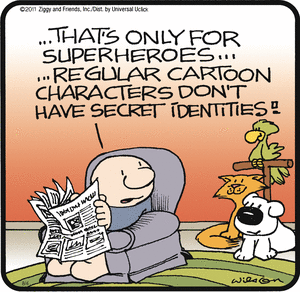
He is incorrect, however, everyone needs secret identities.
Facebook’s Trolling for Keywords
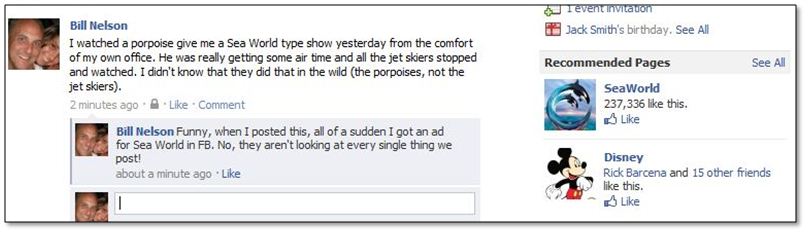
I posted a status to Facebook that included the words “Sea World” and all of a sudden I received a recommended page for Sea World and other Orlando theme parks in their advertisement section. Does anyone really think that Facebook isn’t parsing every post for nuggets they can glean and use for advertising purposes?
From a technical perspective, it is pretty impressive. From a privacy perspective, it is very very scary.
Is Your Intellectual Property Slipping Out the Door with Their Pink Slip?

(I wrote the following article for BABM Business Magazine back in May/June of 2009. The article is reprinted here with their permission.)
With the latest layoff news continuing to add chaos to the economy, CEOs need to protect their businesses in case of staff cuts, restructuring or consolidation of offices. While your company may not be planning layoffs now, there is no guarantee that in three or six months from now this will be the case. There are steps your business should take, both proactively and reactively, to ensure that your most valuable information such as customer data and contracts isn’t walking out the door with terminated employees.
Ideally, even before layoffs occur, businesses need to be prepared to protect their assets. Employees may sense a layoff is imminent and start grabbing what data they can before they get the official word. This could lead to a loss of your company’s most valuable contacts that former employees may use to compete against you. Proactive monitoring of systems, before layoffs begin, can ensure that your company’s data is protected.
There are a variety of technologies you can implement to monitor your employees’ access of specific applications. For example, you can monitor who has access to what type of database and determine if an employee is running unusual reports. Are certain employees extracting every field, downloading the data to a local disk and/or sending it to themselves over email?
Having a solid process for role provisioning and access management will help limit access of certain information to those people who need it to do their jobs. If levels of access to various applications and corporate information are assigned for each job description, it is easier to set up monitoring systems for each employee as well as protocols for changing passwords and other termination procedures to remove access when an employee is let go.
A good rule of thumb is to trust, but verify. Monitoring can be performed at many levels and includes database access, disc usage, and whether or not USB drives are being plugged into company computers. Monitoring can even determine if proprietary data is being sent to an email account. When it comes to access management and monitoring, CEOs and executive management need to weigh how much protection they want with how much they protection they can afford. It’s a formula that will vary for every company.
Once a company is in an action stage and layoffs are about to begin, it’s almost too late to protect and secure its data without shutting off access altogether (which may not be feasible in all cases). As a fallback plan, many companies provide their security team with a list of users they plan to let go. On the morning the layoffs are to take place, the team is tasked with acting on the list and locking out those employees from their accounts. But there’s often the lingering feeling that something was missed. Are they prevented from accessing your systems remotely? Are they still receiving their email on their home PCs? Does the employee have access to vendor accounts? Can your security team effectively map the employee to all the accounts they have accumulated over the years?
There are many types of technologies that can be used from a proactive perspective and subsequently verified from a reactive perspective. CEOs should be proactive and have an effective user provisioning solution in place. This ensures that they have accounted for all the systems and the types of system access where a user has an account. Once layoffs have occurred companies should continue monitoring mission critical systems to ensure that the access has been terminated appropriately. A security event monitoring solution on the back end can monitor log files or traffic patterns to these systems and immediately notify of any unusual activity.
Companies that have implemented centralized account management systems have peace of mind that they can quickly prevent access by employees who are no longer associated with the company. They can be certain that they have locked all accounts being managed by the system and actions such as terminations can be performed by management (ahead of time) rather than needing to involve people from the security team.
Companies that have not implemented a centralized account management system are increasing their workload and effectively putting valuable corporate assets at risk. At this point, there has to be due diligence as you have to perform these tasks manually. The potential for damage is great, however, and fallout will rise exponentially as more layoffs occur. If you have implemented a centralized user provisioning system, congratulations! If not, don’t panic, there are still tasks you can perform to help protect your assets.
- Prepare your list well in advance and give your security team a chance to locate the various user accounts.
- Work with functional managers, supervisors, or project managers to further determine the user’s access.
- Monitor system logs and network traffic to determine if any unusual access or traffic patterns appear. Respond immediately.
Even with this type of preparation, the tasks can be quite time consuming and it could take weeks to properly locate and delete access. Hence, our advice is that it’s better to take more proactive steps to avoid headaches and possible customer data and other business asset loss later on. Getting a handle on your role provisioning and user access procedures and having a plan for monitoring employee application use are good places to start.
Staff reduction is never easy and you should make the separation as painless as possible. It is unfortunate that some employees view corporate assets as their own and feel entitled to take information with them when they leave. As a business owner responsible to shareholders or even to the remaining workforce, you need to take every action possible to ensure the protection of this data.
Advice to CIOs for High Exposure Projects
I read an article in CIO Magazine about the plight of today’s CIOs when multi-million dollar multi-year projects go awry. The article entitled “The CIO Scapegoat” indicates that it is unfair to hold the IT department completely responsible when there are so many other business units that contribute to a project’s demise. In many cases, the CIO takes the fall for the failure and, as a direct result, they are either demoted, moved into a different organization or let go altogether.
The article goes on to provide advice to CIOs who are beginning such undertakings. First and foremost, large, complex projects should be broken up into “bite-sized” chunks and proper expectations of what will be delivered in each “mini-project” should be set – and agreed upon – with the various stakeholders.
I could not agree more with this statement and find it most concerning that this is not more of a common practice within the IT industry. In our World of rapid prototyping (turned production) and just-in-time development, to think that you could perform a multi-year project without implementing several checkpoints along the way is simply insane. This may be one of the reasons why the average life-span of a CIO is only two years within the same company.
CIOs who agree to perform projects under such conditions really need to read my previous blog entitled “Lessons Learned from Enterprise Identity Management Projects“. While it was written mainly for enterprise identity projects it has direct applicability to any enterprise project. In that article I directly address specific points about expectation setting and bite-sized chunks (did CIO Magazine read my blog on this?) and by taking my advice to heart, the average CIO might be able to extend their stay.
Opinions About the Federal Government’s Identity Initiative
Interesting read. This is essentially a WebSSO initiative with authentication based on CAC type ID cards or OpenID.
The CAC type of implementation (ID Cards) are not practical as they require everyone to have a card reader on their PC in order to do business with the government. I don’t see this happening anytime too soon.
I understand that there are several holes in the OpenID initiative. I wonder if they have been fixed (I wonder if it matters).
Either way, Sun’s openSSO initiative is well positioned as it allows OpenID as a form of authentication. The fact that the government is looking at open source for this (OpenID) bodes well for openSSO.
Link to article on PCmag.com:
http://blogs.pcmag.com/securitywatch/2009/09/federal_government_starts_iden.php.
Text version of the article:
Federal Government Starts Identity Initiative
As part of a general effort of the Obama administration to make government more accessible through the web, the Federal government, through the GSA (Government Services Administration), is working to standardize identity systems to hundreds of government web sites. The two technologies being considered are OpenID and Information Cards (InfoCards). The first government site to implement this plan will be the NIH (National Institutes of Health).
OpenID is a standard for “single sign-on”. You may have noticed an option on many web sites, typically blogs, to log on with an OpenID. This ID would be a URI such as john_smith.pip.verisignlabs.com, which would be John Smith’s identifier on VeriSign’s Personal Identity Portal. Many ISPs and other services, such as AOL and Yahoo!, provide OpenIDs for their users. When you log on with your OpenID the session redirects to the OpenID server, such as pip.verisignlabs.com. This server, called an identity provider, is where you are authenticated, potentially with stricter measures than just a password. VeriSign is planning to add 2-factor authentication for example. Once authenticated or not, the result is sent back to the service to which you were trying to log in, also known as a relying party.
Information Cards work differently. The user presents a digital identity to a relying party. This can be in a number of forms, from a username/password to an X.509 certificate. IDs can also be managed by service providers who can also customize their authentication rules.
The OpenID Foundation and Information Card Foundation have a white paper which describes the initiative. Users will be able to use a single identity to access a wide variety of government resources, but in a way which preserves their privacy. For instance, there will be provision for the identity providers to supply each government site with a different virtual identity managed by the identity provider, so that the user’s movements on different government sites cannot be correlated.
Part of the early idea of OpenID was that anyone could make an identity provider and that everyone will trust everyone else’s identity provider, but this was never going to work on a large scale. For the government there will be a white list of some sort that will consist of certified identity providers who meet certain standards for identity management, including privacy protection.
Identity Management Lessons from Sarah Palin
By now, many of you have already heard about the hacking of Alaska Governor Sarah Palin’s Yahoo e-mail account earlier this week (on or about Tuesday 9/16/2008). If not, here is a brief synopsys of the story.
Sarah Palin’s personal Yahoo e-mail account was compromised and the contents of her account (including her address book, inbox and several family photos) were posted to the Internet.
Someone with the e-mail address of rubico10@yahoo.com posted a message on the Web site 4chan about how he used Yahoo! Mail’s password-recovery tool to change the Alaska governor’s password and gain full access to her e-mail account.
“i am the lurker who did it, and i would like to tell the story,” rubico10@yahoo.com wrote.
(I have included the full text at the bottom of the post for those interested. Be forewarned that some of the language is NOT family friendly.)
The rubico10@yahoo.com e-mail account has been linked to 20-year old David Kernell; son of democratic Tennessee State Representative, Mike Kernell, and a student at the University of Tennessee-Knoxville. While David has not been included in any official investigation as of yet, his father, has confirmed that the person being the subject of the many blog posts and news articles around the Internet is indeed his son.
So how did the alleged hacker do it?
First of all, he had to identify Sarah Palin’s email address to be gov.palin@yahoo.com. A recent article in The Washington Post indicated that Sarah Palin was using a personal e-mail address of gov.sarah@yahoo.com to conduct government business. But that was not the e-mail account that got hacked. So how do you get from gov.sarah@yahoo.com to gov.palin@yahoo.com?
Allahpundit posted an article on hotair.com that presents some interesting ideas about how the hacker might have arrived at the gov.palin@yahoo.com account, but for the time being — and void of any conspiracy theories — let’s just assume he figured it out.
Now that he had the e-mail address, how was he able to gain access to the account?
The hacker claims to have used Yahoo! Mail”s password-recovery tool to reset the password. To do this, you simply go to Yahoo! Mail and click on the Forget your ID or password link.
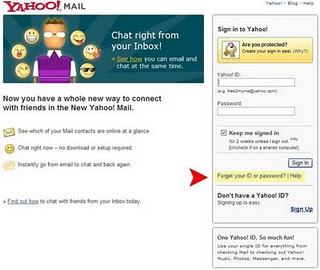
This takes you to a page where you enter your Yahoo! ID. In the case of Sarah Palin’s account, this would be “gov.palin”.

To reset your password with Yahoo! Mail, you can either have it sent to your secondary email address or you can indicate that you no longer have access to this account.
(As a side note, I do not particularly like the fact that Yahoo! shows even a portion of my secondary email account in the email address HINT. But that is another story. )

Selecting the “I can’t access my alternate email address” radio button allows you to answer questions to challenge questions as follows:

These are generic authentication questions, but in the case of Sarah Palin, the hacker had to answer one additional question that had to do with where she met her husband. The hacker guessed that Alaska’s governor had met her husband in high school, and knew the Republican vice presidential candidate’s date of birth and home Zip code, the Associated Press reported. Using those details, the hacker was able to successfully access Palin’s email account where he was able to assign a new password of “popcorn”.
The rest is simply news.
So what does the hacking of Sarah Palin’s email account tell us about security and Identity Management in general?
One of the big benefits of an Identity Management solution is that it provides end-users with a way to update their own data and reset their own passwords. This is a HUGE cost reduction for companies as it reduces the number of calls to the Help Desk. But just like everything else, there has to be a careful balance between security and convenience.
Authentication questions provide a means for users to gain access to their accounts when they have forgotten their passwords. This is the mechanism that Yahoo! Mail uses and has been adopted by many Identity Management solutions. Authentication questions are extremely convenient for companies that have password policies that are so stringent that their users cannot remember their passwords. They also come in handy after three-day holiday weekends as the day that employees return to work typically generates numerous calls to the Help Desk for password reset.
While authentication questions are convenient and produce a cost savings, a company does, however, need to take care when providing this solution. Who decides what the questions are and what happens if the end-user does not have an answer for a particular question? These are some of the issues that need to be considered. I have seen questions all over the board. Below are some of the ones that I find particularly insecure since many of them can be answered by Google searches or social engineering. In some cases, the questions cannot be answered with one answer and some cannot be answered at all.
Questions that can be answered by social engineering or search:
· What is your mother’s maiden name?
· In what city where you born?
· In what year where you born?
· What was your first school?
· What was your first phone number?
Questions that might not be answered at all:
· Who is your favorite superhero?
· What is your pet’s name?
· What is your library card number?
· What was your first teacher’s name?
· What is the air speed velocity of a coconut-laden swallow?
If you force a user to provide answers that are easily obtainable, then your risk is drastically increased (just ask Sarah Palin). If you force users to answer questions that are difficult (or impossible) to answer, then then your risk is also increased as the user may just provide a common answer to all questions (i.e. “blue”). So either way you go, it can be a difficult decision to make.
I have found that one of the best mechanisms is a an approach that allows the end user to define their own set of authentication questions while the company provides a sample set of common (yet hopefully secure) questions as well. This allows the company to have certain control, but also allows the user the ability to provide questions and answers using information that only they know. Now, I know that some may argue that users typically pick the path of least resistance and that many of them will pick easy questions (and therefore have easy answers) but by combining a set of the company-specific questions in addition to those supplied by the user the company can bridge the gap between security and convenience.
By the way, if you use an application that allows you to provide your own authentication questions, then I STRONGLY suggest that you go and provide your own security question(s) to one(s) that have meaning and applicability to you.
Here is the synopsis of what rubico said at 4chan:
|
rubico 09/17/08(Wed)12:57:22 No.85782652
Hello, /b/ as many of you might already know, last night sarah palin’s yahoo was “hacked” and caps were posted on /b/, i am the lurker who did it, and i would like to tell the story. In the past couple days news had come to light about palin using a yahoo mail account, it was in news stories and such, a thread was started full of newfags trying to do something that would not get this off the ground, for the next 2 hours the acct was locked from password recovery presumably from all this bulls**t spamming. after the password recovery was reenabled, it took seriously 45 mins on wikipedia and google to find the info, Birthday? 15 seconds on wikipedia, zip code? well she had always been from wasilla, and it only has 2 zip codes (thanks online postal service!) the second was somewhat harder, the question was “where did you meet your spouse?” did some research, and apparently she had eloped with mister palin after college, if youll look on some of the screensh**s that I took and other fellow anon have so graciously put on photobucket you will see the google search for “palin eloped” or some such in one of the tabs. I found out later though more research that they met at high school, so I did variations of that, high, high school, eventually hit on “Wasilla high” I promptly changed the password to popcorn and took a cold shower… >> rubico 09/17/08(Wed)12:58:04 No.85782727 this is all verifiable if some anal /b/tard wants to think Im a troll, and there isn’t any hard proof to the contrary, but anyone who had followed the thread from the beginning to the 404 will know I probably am not, the picture I posted this topic with is the same one as the original thread. I read though the emails… ALL OF THEM… before I posted, and what I concluded was anticlimactic, there was nothing there, nothing incriminating, nothing that would derail her campaign as I had hoped, all I saw was personal stuff, some clerical stuff from when she was governor…. And pictures of her family I then started a topic on /b/, peeps asked for pics or gtfo and I obliged, then it started to get big Earlier it was just some prank to me, I really wanted to get something incriminating which I was sure there would be, just like all of you anon out there that you think there was some missed opportunity of glory, well there WAS NOTHING, I read everything, every little blackberry confirmation… all the pictures, and there was nothing, and it finally set in, THIS internet was serious business, yes I was behind a proxy, only one, if this s**t ever got to the FBI I was f****d, I panicked, i still wanted the stuff out there but I didn’t know how to rapids**t all that stuff, so I posted the pass on /b/, and then promptly deleted everything, and unplugged my internet and just sat there in a comatose state Then the white knight f****r came along, and did it in for everyone, I trusted /b/ with that email password, I had gotten done what I could do well, then passed the torch , all to be let down by the douchebaggery, good job /b/, this is why we cant have nice things |

 |  |  |  |  |
 Easy Identity